

Audible Goods Audible Goods

Drift Test Module

Variance analysis

Sing a few phrases and find the keys your voice actually sings best in.

Then move a song to one of them. Record the melody once and it ranks every transposition an octave either way.

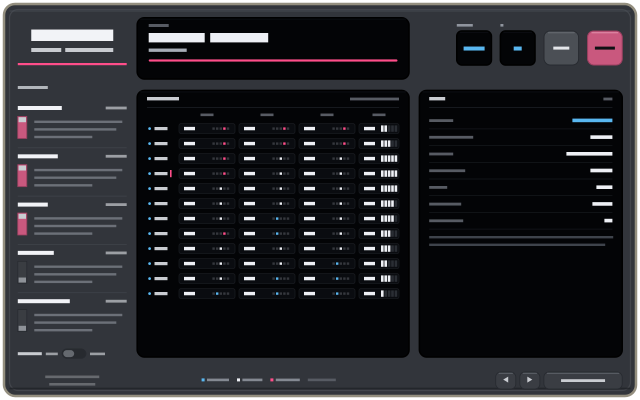
A matrix of every key against every phrase test, a summary map beside it, and five tests on rocker switches down the left.

Why it exists

Songs get written in whatever key falls under your hands on the instrument, and then sung wherever the chart happens to land. But intonation, steadiness and agility are not flat across a voice. They change key by key, often sharply around a register break.

This measures that, and turns it into a transposition you can act on.

Using it

twelve minutes for five

  1. Choose the phrases

    Five tests, on rocker switches: held tones, a stepwise scale, widening leaps, a fast octave run and a slow descent. Three is a good first pass; five is about twelve minutes of singing.

  2. Calibrate your range

    Sing your lowest and highest comfortable note. Each locks after 1.4 seconds held steady. Comfortable means a note you could sing a whole song on, not your absolute floor or ceiling.

  3. Sing each key back

    The module plays the phrase, gives four count-in clicks, then records while you sing it. A lamp lights in the matrix as each take lands, and it climbs a semitone — or a whole tone — per key, up to twelve.

  4. Read the map

    Every cell prints its score beside a five-pixel strip showing how far off you were and which way. The total column ranks that key against the others out of five bars, and the map beside it names the strongest key, the band around it and the weakest.

  5. Fit a song

    Record a melody once. The module builds a comfort curve from every note you sang, slides the melody across it, and ranks every transposition from an octave down to an octave up.

What the numbers mean

Scores are relative to your own takes and to nobody else's. One take per cell carries roughly ±2 to ±8 points of take-to-take variation depending on how steady a singer you are, so the module reports its own noise floor and greys out any difference sitting inside it rather than dressing it up as a result.

If your voice has no key preference, it says so. “No key wins here” is a real answer, and a useful one — it means the key is yours to choose on playability instead.

Nothing is distinguished by colour alone. The variance strip encodes its sign as a side before it is a hue — left of centre is flat, right is sharp — and every cell prints its number next to it.

Nothing is uploaded

Audio is analysed as it arrives and discarded. What a take leaves behind is a list of pitches, durations and scores, and that is what the map is drawn from — there is no recording kept and nowhere for one to be sent.

Saved sessions live in the browser's own storage, on the machine you sang on. Clearing site data clears them, and there is no account to keep them anywhere else.

The shape of it

Wear headphones. Without them the reference tone bleeds into the microphone during the count-in and the first recorded frames, and the measurement is of your speakers as much as of your voice.

The console is a fixed deck rather than a page that reflows, and it assumes a pointer — so a phone gets a short message instead of a squeezed instrument. A tablet is wide enough and gets the real thing.

No build step, no server and no accounts. The microphone needs a secure origin, so it wants HTTPS rather than a file opened from disk, and after the first load it runs with no connection at all.

Specifications

InputMicrophone — sung phrases, one key at a time
Tests5 phrases: held tones, stepwise, leaps, fast run, descending
KeysUp to 12, a semitone or a whole tone apart
Per cellA score out of 100, and cents off with its sign
MapStrongest key, top band, weakest key, spread, noise floor
Song fitEvery transposition from an octave down to an octave up
StoredSessions in the browser, on this machine. No audio.
NeedsHTTPS or localhost for the microphone, headphones, and a pointer
OfflineYes, after first load. Installable to a home screen.
AccountNone
← All products